
Implementing Data Engineering Solutions Using Azure Databricks DP-750 Exam Questions
Preparing for the DP-750 exam is simple with ExamsTeacher. We offer easy-to-understand study materials that help you learn the most important exam topics. You can study using our PDF questions, practice online with a real exam-style test, or use the desktop practice software. Choose the study method that works best for you and prepare at your own pace.
At ExamsTeacher, we keep our DP-750 practice questions up to date. Whenever the exam syllabus or objectives change, we update our study materials so you always learn the latest topics. This helps you save time, avoid outdated content, and feel more confident when you take your exam.
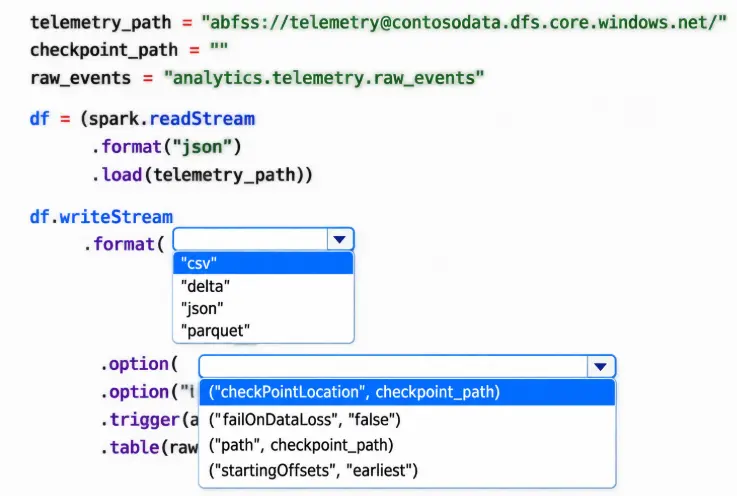
You need to complete the PySpark code for the Spark Structured Streaming pipelines. The solution must meet the data ingestion and processing requirements.
How should you complete the code segment? To answer, select the appropriate options in the answer area.
NOTE: Each correct selection is worth one point.
Answer
Answer:
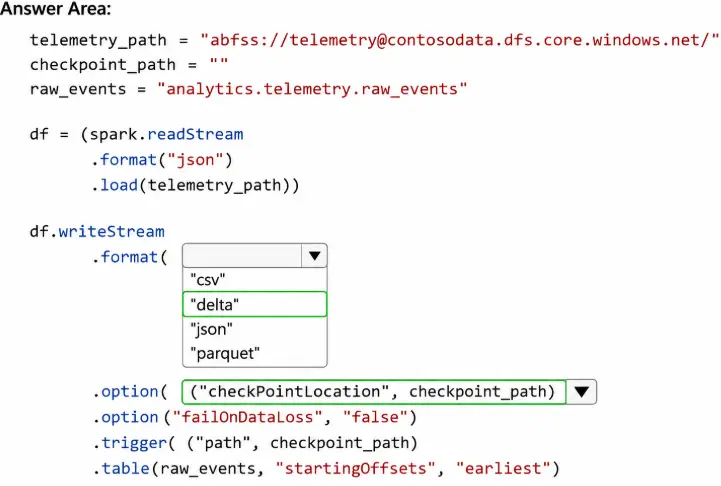
The solution requires spark.readStream with format( ' cloudFiles ' ) for Auto Loader, paired with .writeStream using mergeSchema=true and a checkpointLocation.
Auto Loader ' s cloudFiles source incrementally processes new JSON files without rescanning the entire directory. The mergeSchema option handles schema drift — when sensors add new fields, the target Delta table schema expands automatically instead of throwing a parse error. This directly addresses Contoso ' s requirement to ' support schema drift. '
The checkpointLocation is what gives the pipeline its resilience. Databricks writes the stream ' s committed offset and schema state to that path. If the cluster restarts, the engine reads the checkpoint and picks up exactly where it left off — no events are reprocessed, satisfying ' exactly-once semantics ' and ' resume processing after failures without reprocessing the data. '
Without a checkpoint, the stream would restart from the beginning on every cluster bounce, which is precisely the problem Contoso is trying to eliminate.
Reference: https://learn.microsoft.com/en-us/azure/databricks/ingestion/cloud-object-storage/auto-loader/schema
You have an Azure Databricks workspace that is enabled for Unity Catalog and contains a Delta table named Orders.
You load the Orders table into an Apache Spark DataFrame named df.
You need to create a DataFrame that excludes rows where the order amount is null.
Solution: You run the following expression.
df.filter(df.order_amount != None)
Does this meet the goal?
Correct Answer: B
The correct answer is B — No.
This is a common Python-to-PySpark trap. In pure Python, comparing a value to None with != works as expected. In PySpark, null comparisons follow SQL null semantics: any comparison involving NULL returns NULL (not True or False). So df.filter(df.order_amount != None) doesn ' t evaluate to True for non-null rows — the comparison itself returns NULL for null values, and Spark interprets NULL in a filter as False, effectively dropping null rows. But the behaviour is undefined in edge cases and is not the documented approach.
More practically, Python ' s None and Spark ' s SQL NULL are different concepts. PySpark Column objects don ' t support Python ' s native equality/inequality semantics for null checking. The result is typically an empty DataFrame or incorrect filtering behaviour.
Always use .isNotNull() or .isNull() for null checks in PySpark column expressions. These methods are specifically designed for SQL-null-aware comparisons and produce correct, predictable results.
[Reference: https://learn.microsoft.com/en-us/azure/databricks/pyspark/basics
You have an Azure Databricks workspace that is enabled for Unity Catalog.
You plan to create a job in Lakeflow Jobs named Job1 that:
• Ingests data from cloud storage
• Runs two independent transformation tasks
The transformation tasks must run only after the ingestion completes and must run in parallel.
You need to design the task logic for Job1.
What should you configure?
Correct Answer: A
Job1 should contain one ingestion task that acts as the common upstream dependency for two separate transformation tasks. Once ingestion succeeds, Lakeflow Jobs can start both downstream tasks concurrently because neither transformation depends on the other. This design represents the actual workflow, avoids duplicated ingestion, and reduces total execution time through parallelism. Creating two ingestion tasks would repeat the same source processing and could introduce inconsistent results or unnecessary costs. A single sequential task would prevent parallel transformation and make failures harder to isolate and retry. Defining three independent tasks without dependencies could allow transformations to start before ingestion has completed. An explicit directed task graph therefore provides the required execution order while preserving parallelism for independent downstream processing.
You have an Azure Databricks workspace that is attached to a Unity Catalog metastore named metastore1. Metastore1 contains a catalog named catalog 1.
You need to create a new schema named schema2 that meets the following requirements:
• Is contained in catalog1
• Uses abfss://containergstorageaccount.dfs.core.windows.net/data as the Managed location
Which SQL statement should you execute?
Correct Answer: A
The correct answer is A. The Unity Catalog DDL for creating a schema inside a specific catalog and setting a custom managed storage path uses the three-part name (catalog.schema) and the MANAGED LOCATION clause:
CREATE SCHEMA catalog1.schema2 MANAGED LOCATION ' abfss://... ' ;
The three-part name explicitly places the schema inside catalog1. MANAGED LOCATION tells Unity Catalog where to store managed tables and volumes created under this schema — any managed table without its own explicit location will inherit this path.
Option B uses CREATE CATALOG, which creates an entirely new catalog rather than a schema. Option C uses the LOCATION keyword without MANAGED — that syntax is for external locations, not for overriding the managed storage path of a schema. Option D uses WITH DBPROPERTIES, which stores arbitrary key-value metadata but has no effect on where Unity Catalog physically stores data.
[Reference: https://learn.microsoft.com/en-us/azure/databricks/sql/language-manual/sql-ref-syntax-ddl-create-schema